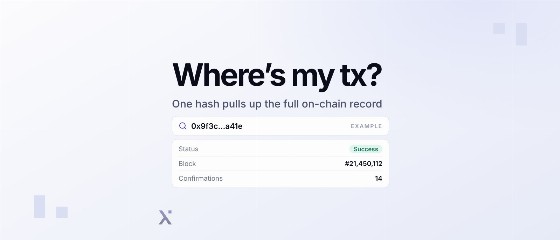
A blockchain explorer is a read-only search tool for chain data. This article explains how to read a transaction, how explorers work under the hood with nodes and indexers, and how to build one for public or private networks, including Canton.
A blockchain explorer is a website or app for searching blockchain data such as transactions, blocks, addresses, and smart contracts. It is a read-only interface, so it can show activity and records but cannot move funds.
For many users, the answer to what is a blockchain explorer comes when a payment is stuck, an exchange deposit has not arrived, or a customer insists they sent funds. The search usually starts with a transaction hash copied from a wallet.
For teams building blockchain infrastructure, explorers also serve another role. Without one, users and auditors cannot verify activity on a new network. The sections below start with reading an explorer, then cover how explorers are built, including on private networks.
What Is a Blockchain Explorer?
A blockchain explorer is also called a block explorer; the two terms mean the same thing. It reads data from blockchain nodes, organizes it, and lets anyone search by transaction hash, address, or block number.
It works like a search engine for a public ledger. Instead of crawling web pages, it follows blocks and transactions as node software exposes them.
Because it only reads data, an explorer does not hold private keys, approve token transfers, or reverse payments.
Early widely used explorers emerged around Bitcoin, where users needed a public way to inspect blocks and transactions outside wallets.
Popular Blockchain Explorer Examples
These explorer examples cover major networks and common search needs.
- Bitcoin: mempool.space, open source and can be self-hosted
- Ethereum and EVM chains: Etherscan; many networks run explorers built on Blockscout, an open-source EVM explorer
- Solana: Solscan
- Multi-chain: Blockchair, which covers several networks in one interface
- Canton Network: CC View, built by PixelPlex
Blockchain Explorer vs Wallet vs Node
These tools often appear in the same workflow, but they do different jobs. A wallet creates and signs a transaction. A node checks and relays it. An indexer turns that raw data into tables, and the explorer displays it in a usable format.
| Component | What it does | Who runs it | Can it move funds? |
| Blockchain explorer | Reads, indexes, displays chain data | Explorer operators, foundations, infrastructure teams | No |
| Crypto wallet | Stores keys, signs transactions | User or custodian | Yes |
| Full node | Validates blocks, relays transactions | Validators, exchanges, providers, individuals | No, only relays signed transactions |
| Indexer | Turns blocks into queryable tables | Explorers, data providers, dApp teams | No |
What Is a Blockchain Wallet?
What Are Layer 2 Blockchain Scaling Solutions and What Benefits Do They Offer?
What You Can See in a Blockchain Explorer
Explorer pages usually center on a few record types: transactions, blocks, addresses, and contracts. The labels change by chain. Bitcoin explorers focus on inputs and outputs. Account-based networks show balances, nonces, contract calls, and token events.
| Data point | What it means | When you check it |
| Transaction hash (TXID) | Unique transaction identifier | To find one exact transaction |
| Block number and timestamp | Inclusion point and recorded time | To see when it was recorded |
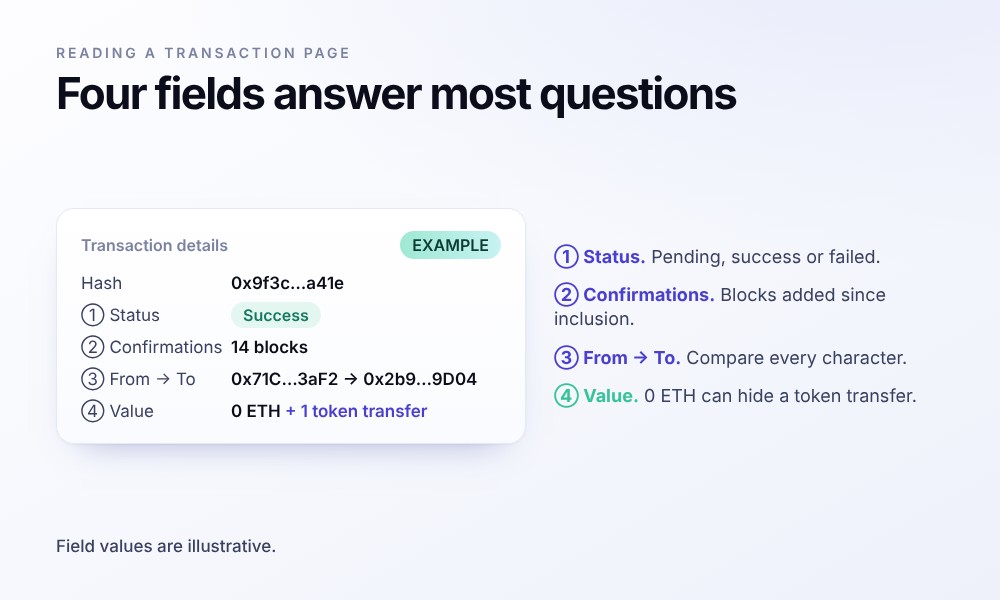
| Status | Pending, successful or failed; some show dropped or replaced | To confirm the current transaction state |
| Confirmations | Blocks added after inclusion | To estimate settlement confidence |
| Fee (gas on Ethereum) | Cost paid to process transaction | To review cost or fee settings |
| From, to and value | Sender, recipient, transferred amount | To verify payment details |
| Address page | Activity and balances for one address | To audit wallet or contract history |
| Token transfers | Token movement recorded by events | To inspect ERC-20 or NFT transfers |
| Smart contract | Code, calls, events, verification state | To inspect application behavior |
| Mempool | Unconfirmed transactions waiting for blocks | To watch pending network activity |
Bitcoin tooling usually says “TXID” for a transaction hash, a unique ID derived from transaction data using a hash. The mempool is the waiting room for unconfirmed transactions, and some explorers, such as mempool.space, are built around that view.
An explorer usually cannot tell you who owns an address. It shows a real-world name only when the operator adds a label, for example for a known exchange wallet.
The value field on an Ethereum transaction page shows only the native ETH sent with the call. An ERC-20 payment moves tokens inside a contract, so the transaction itself often carries 0 ETH. The contract records the movement as a Transfer event, and the explorer decodes that event into the token transfers tab. Check that tab for the real amount, token and recipient.
How to Use a Blockchain Explorer to Check a Transaction
Checking a transaction usually takes a few steps. Most mistakes come from using the wrong network or reading the wrong field.
- Copy the TXID from your wallet, exchange, or application log. Do not shorten it manually.
- Open the explorer for the right network. An Ethereum hash will not appear on a Bitcoin explorer, and for EVM chains you still need the exact chain.
- Paste the TXID into the search bar. Most explorers route you directly to the transaction page if the ID exists.
- Read the status and confirmations. This tells you whether the transaction is pending, included, or failed.
- Check the recipient address and amount character by character against what you expected. Do not rely on visual similarity.
- For tokens, open the token transfers tab. The top-level value may show 0 ETH even when a token transfer happened.
Pending, Failed and Dropped Transactions
Pending means the transaction has been broadcast but is not in a block yet. A common reason is a fee that other transactions outbid. On Ethereum, the sender can replace a pending transaction by sending another transaction with the same nonce and a higher fee, if the wallet supports that flow.
On smart contract chains such as Ethereum, failed means the transaction was included in a block and the fee was paid, but execution reverted. Typical causes include a contract error, failed validation, or running out of gas.
Dropped means the transaction was removed from mempools and never included in a block. Explorer treatment varies: some hide dropped transactions, while others keep a pending or replaced record.
Staying Safe When Using Explorers
Bookmark the official explorer URL for every network you use often. Phishing sites copy explorer layouts, and some have appeared as paid search ads, so typing a name into search is weaker than using a saved link.
A legitimate explorer does not need your wallet to show a transaction, so treat any prompt to connect and “verify” as a red flag. Connecting a wallet is only needed for writing to contracts, and that action should be deliberate.
Watch for address poisoning. Attackers send tiny or zero-value transfers from look-alike addresses so they appear in your history. Never copy a recipient from the history list. Use a saved address, an address book entry, or a fresh address from the intended recipient.
Everything You Need to Know About Blockchain Security
Top 5 Web3 Security Tools in 2026
How a Blockchain Explorer Works: From Node to Search Bar
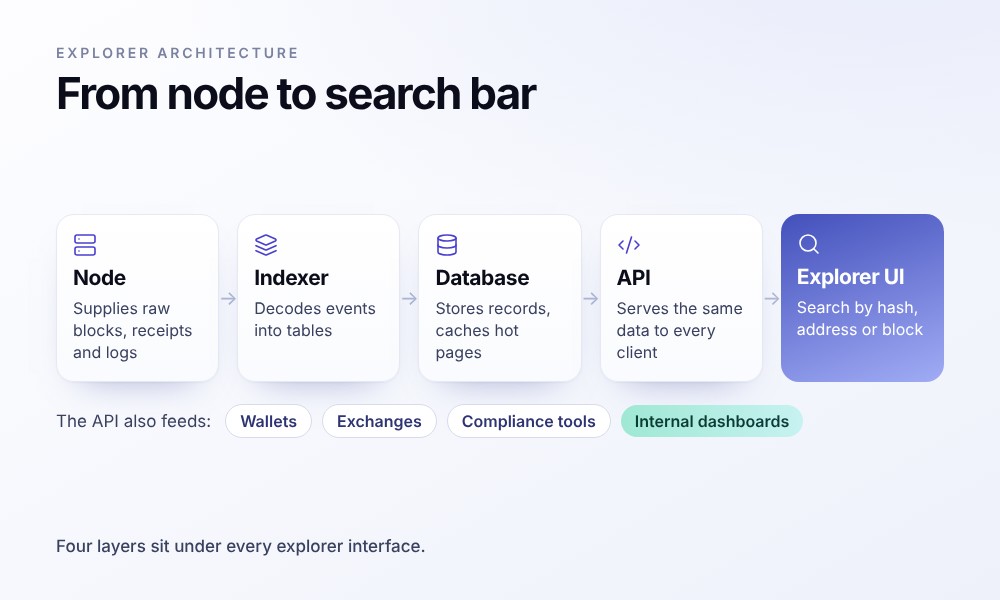
Under the interface sit four layers. A node supplies raw blocks, an indexer decodes them, a database stores the results, and an API serves them to the web interface and external apps.
The Node Layer
An explorer needs access to at least one trusted full node, whether self-operated or supplied by an infrastructure provider. That node is the source for blocks, transactions, receipts, and logs exposed through RPC calls or client-specific interfaces.
For Ethereum historical state queries, a standard full node is often not enough. An archive node stores historical state, so the explorer can answer questions about balances, storage, or contract state at prior blocks. Per Ethereum’s archive node docs, Erigon, Reth, and Geth with path-based archive store a mainnet archive in roughly 2–3 TB, while Besu and Nethermind archives need 12 TB or more. The same page lists block explorers among typical archive node users.
Not always. A full node is enough to follow new blocks, decode transactions and show current balances. An archive node becomes necessary when the explorer must answer questions about balances, storage or contract state at earlier blocks. That history costs disk space: Ethereum’s documentation puts a mainnet archive at roughly 2–3 TB on Erigon, Reth or path-based Geth, and at 12 TB or more on Besu or Nethermind.
In production, many teams run more than one node or client. If one node lags, misreports, or corrupts data, the explorer can compare responses before displaying inconsistent data.
The Indexer: Making Chain Data Searchable
The Graph’s documentation explains that blockchains are optimized for writing and verifying transactions, not for reading or analyzing them. Data sits in an append-only chain of blocks with no tables or relationships, so a query such as “all transfers for this user” means scanning block by block.
That is where a blockchain indexer comes in. It follows new blocks, decodes transactions, logs, and events, then writes normalized records into tables keyed by address, block, token, and contract. On Ethereum, for example, blockchain indexing often includes decoding ERC-20 Transfer events so the explorer can show token movements without replaying every block for each search.
Some teams outsource this layer. The Graph, one such indexing network, says it has served over 1.27 trillion queries to more than 75,000 projects as of early 2026.
Database and API
After indexing, the explorer stores structured data in relational or columnar databases, usually with caches for hot pages such as recent blocks and popular contracts. A search index handles exact lookups for transaction hashes, addresses, human-readable names, and contract labels.
The same API that feeds the web UI is often exposed to developers as a blockchain API. Wallets, exchanges, compliance tools, and internal dashboards call it instead of running their own nodes and indexers. Etherscan says its API covers 50+ EVM chains under one key.
Reorgs, Confirmations and Finality
Explorers show recent blocks before they are final, so the indexer must handle chain reorganizations. The Bitcoin developer guide describes how nodes switch to a heavier chain and discard stale blocks. When that happens, the explorer has to roll back the records it indexed from those stale blocks, then apply the replacement blocks in the new chain.
On Bitcoin, the block interval averages 10 minutes, and 6 confirmations is the common convention, according to the Bitcoin Wiki. On Ethereum, proof-of-stake uses 12-second slots and epochs of 32 slots, per the proof-of-stake docs. Ethereum’s roadmap page on single slot finality describes current finality as taking about 15 minutes. An Ethereum transaction can show as successful right after inclusion in a block, while finality is reached later.
Explorers should label each state (pending, included, confirmed or finalized) so users do not have to infer it from raw block numbers.

What Is the Difference Between Blockchain Consensus Algorithms?

What Are the Top Smart Contract Platforms and How to Choose the Right One?
Types of Blockchain Explorers
Explorers differ by network coverage, indexed data depth, and access rights. Teams choosing one for users, operations, or compliance should start with scope: public-chain coverage, self-hosted infrastructure, or permissioned-network visibility.
| Type | Typical examples | Best for | Main limitation |
| Single-chain explorer | Etherscan (Ethereum), Solscan (Solana), mempool.space (Bitcoin) | deep chain-specific detail, contract verification | one network per site |
| Multi-chain explorer | Blockchair; explorer families such as Etherscan’s EVM-chain sites | comparing activity across chains | less depth per chain, uneven coverage |
| Open-source, self-hosted | Blockscout (EVM), mempool.space (Bitcoin) | new L1s/L2s and teams that want control | you run nodes, indexer and upgrades |
| Analytics and investigation tools | blockchain analytics and tracing platforms | fund flows, risk scoring, compliance cases | labels are interpretations, often paid |
| Private or permissioned network explorer | Canton explorers such as CC View | institutional networks with privacy rules | shows only data the operator is allowed to see |
Blockscout describes itself as an open-source explorer for EVM chains, with support for 1000+ L1s, L2s, L3s, and rollups. The mempool.space code is open source and can be self-hosted, including one-click installs on Raspberry Pi node distributions such as Umbrel and Start9, according to the mempool GitHub repository. Blockchain analytics products extend explorer data into tracing, risk scoring and compliance review, and some of them market themselves as a crypto explorer too.
Explorers for Private and Permissioned Networks: The Canton Case
Public chains broadcast transaction data to every node, so an explorer can index full history from its own node and enrich it with decoded contracts, labels, and interface data. Permissioned and privacy-focused networks work differently: visibility there depends on governance, access rules, and the privacy model (see public vs private blockchains).
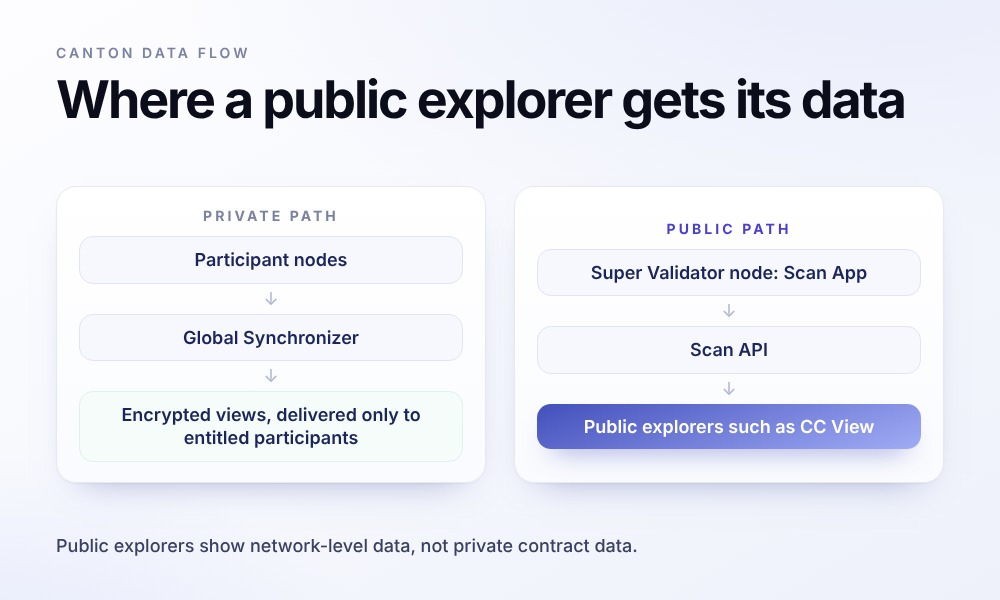
Canton Network is a useful example because its design rejects the idea that every node should see every transaction. Per the Canton privacy model, participants see only the parts of a transaction they are entitled to see. Per Canton’s documentation, a multi-party transaction is split into views based on stakeholder relationships, and each view is encrypted for its recipients.
A standard participant node does not see the full network state. Public Canton explorers work from data exposed by Super Validators. The Scan App, part of a Super Validator node, stores the transaction history and active contract set as seen by Super Validators and serves that data through the Scan API. This is enough for Canton Coin transfers, validator activity, rewards, and governance. It is not a feed of private institutional contract data.
Teams building an explorer on a private network should start with the visibility boundary rather than the UI. Decide what the explorer can show, then separate public network metrics from data visible only to a participant node. A compliance console may need a private deployment connected to the firm’s own participant node, with access controls aligned to internal policy and legal duties.
Yes, within its own visibility. A participant node holds only the transaction views its parties are entitled to see, so an explorer connected to that node can index and search those views and nothing else. This is how a private deployment works for compliance or operations teams. Network-wide figures, such as Canton Coin transfers or validator activity, still come from the Scan API that Super Validators serve.

Private Blockchain Development in 2026: A Step-by-Step Guide

Canton Network Reward System: How Canton Coin Pays Developers to Build Real Value
Build, Fork or Integrate: How to Get a Block Explorer for Your Chain
A team launching a new chain, token network, or private ledger has four practical routes to create a block explorer. You can self-host an open-source explorer, use a managed block explorer hosting service, pull data through existing APIs, or build a custom explorer with its own indexer.
| Option | Fits when | Time to first version | Control and ongoing work |
| Self-host open-source (e.g., Blockscout for EVM) | standard EVM chain, standard contracts | fastest for EVM-compatible chains | full control; your team runs nodes, indexer, upgrades |
| Hosted explorer service (block explorer hosting by a vendor) | small team, standard chain, quick launch | fast | vendor runs it; limited custom data views |
| Data API only (Etherscan API, The Graph, CryptoAPI) | you need data inside your app, not a public explorer | fast for supported chains | depends on provider coverage and rate limits |
| Custom explorer and indexer | non-EVM or new data model, private network, custom metrics | longest | full control over data model, UX and APIs |
What Drives Cost and Timeline
Most of the budget goes into data work: what the chain emits, how much history you index and who may see it.
- Chain architecture affects parsing logic, especially across EVM, UTXO, custom VM, and Daml-based systems.
- History depth drives backfill work, storage design, and archive-state choices.
- Contract and token decoding depends on verified sources, ABIs, and supported standards.
- Real-time requirements affect subscriptions, queue design, and reorg handling.
- API scope shapes caching, rate limits, authentication, and SLA commitments.
- Privacy and access rules define what permissioned users can search, export, or share.
Features Beyond Search
Operations teams use explorers for more than search. Webhooks can notify support, treasury, or compliance teams about large transfers, failed transactions, or unusual token movement. Labels and name services reduce address ambiguity, especially when internal wallets, exchanges, and contract owners interact often.
Network teams usually need analytics views for validator health, fee behavior, token supply, and contract usage. Finance and audit teams need exportable transaction data with consistent timestamps, identifiers, and filters. Compliance teams may need transaction screening and risk signals tied into transaction monitoring software, especially for token networks exposed to external wallets.
For smart contract platforms, verified source code is a product feature and a control point. Linking deployed bytecode to source, compiler settings, and review history gives developers a clear audit trail, particularly when paired with a smart contract audit.
How to Audit a Smart Contract in the Most Efficient Way

Know Your Transaction (KYT) Explained: Understanding its Role in Financial Compliance
How PixelPlex Has Built Explorers and Indexers
We have built explorers and indexers as standalone products and as part of protocol engineering work. The most visible example is ccview.io, our explorer for Canton Network, covered in a detailed CC View case study.
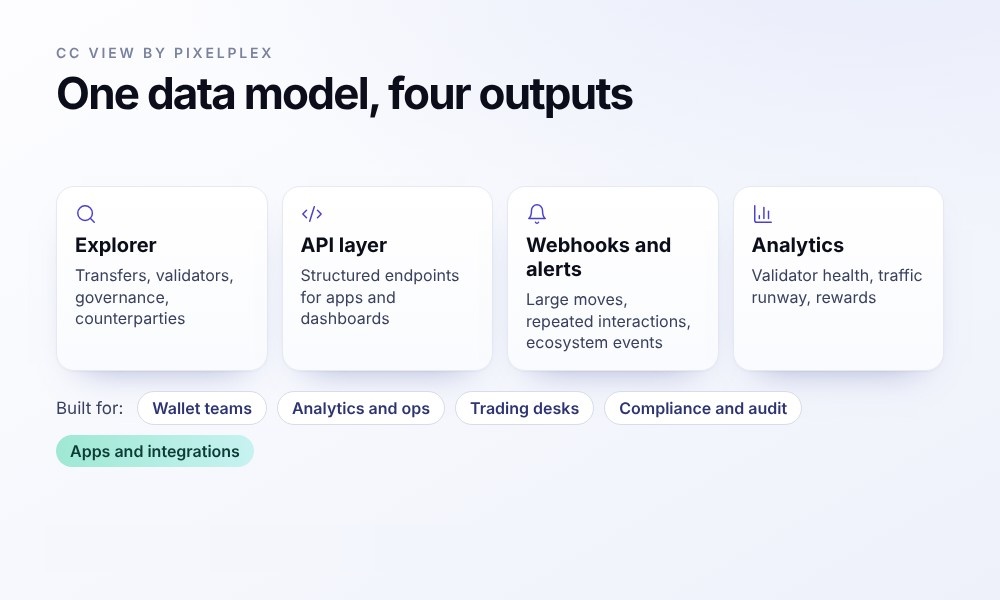
For CC View, we designed and delivered a real-time Canton explorer covering transfers, validators, governance and counterparties, plus a structured API, webhooks and alerts for transfers, repeated interactions, large moves and ecosystem events. We also built operational analytics for validator health, traffic runway, rewards and governance activity. The first version was delivered in 1.5 months. According to the case study, CC View has indexed 580+ days, 96.7M+ transfers and 132.5M+ updates, with a reported 100% success rate across 6.05M+ total requests. CC View received Canton Foundation Featured App status on December 1, 2025.
We also built CCTrace, a transaction tracing and investigation tool for Canton. It supports fund flow analysis, counterparty risk review, a shared investigation workspace and private deployment connected to a participant node. CCTrace uses risk data from Intercepta, our onchain security and transaction monitoring product.
Earlier explorer work:
- The Echo protocol shipped with Echo explorer, showing current state and transaction history through graphs, charts and tables.
- For Qtum, a UTXO-based, Bitcoin-derived chain with EVM support, our full-stack work included the web portal, back end, block explorer and wallet.
- A provably fair betting platform received a block explorer UI for tracing betting transactions.
The CC View case study describes the core job as translating cryptic protocol messages into clear events that teams can act on.
Limitations of Blockchain Explorers
Some fields come straight from the protocol. Others depend on indexing logic, enrichment rules and access rights.
- Most explorers cover one network per site unless built for multi-chain use.
- Labels and risk tags are operator interpretations, not protocol facts.
- Explorers can disagree on derived data, including token prices, USD values or internal transactions.
- Public APIs have rate limits and latency, so production systems need backoff logic and monitoring.
- Private networks expose only data the operator is entitled to see.
How PixelPlex Helps
We design and build explorers, indexers and data APIs for public and private chains, from node setup to UI. Our work can start with blockchain consulting for architecture and data modeling, continue into blockchain development for the explorer and indexing stack, and extend into blockchain integration when data has to feed wallets, compliance tools or internal systems.
For Canton projects, we provide Canton development around participant-node data, privacy-aware views and business-event mapping. We also support data analytics for dashboards, alerts and operational reporting.
If you are planning an explorer, indexer or blockchain data API, our team can help assess architecture, indexing scope and privacy requirements.
FAQ
A block explorer and a blockchain explorer are the same type of tool. The terms are used interchangeably, though “block explorer” is more common in Bitcoin and developer contexts. Both let users look up blocks, transactions, addresses, and related on-chain records.
A blockchain explorer is not the same as a crypto wallet. Explorers are read-only: they show transactions, balances, contract calls, and block data, but cannot sign transactions or move funds. Wallets manage keys and create transactions.
Most public blockchain explorers are free to browse through a web interface. Their blockchain API plans often have free tiers with rate limits, plus paid plans for higher volumes or commercial use. Exact limits depend on the operator and integration needs.
Protocol data in a synced blockchain explorer is usually reliable because it comes from nodes. Transaction hashes, block numbers, addresses, and amounts are on-chain fields. Labels, token prices, and risk tags are the operator’s interpretation, so cross-check them on a second explorer or your own node.
A pending transaction usually means the fee is too low for current demand or the network is congested. On Ethereum, the sender can replace it by using the same nonce and a higher fee. It stays pending until included in a block.
A blockchain explorer can show only data it is allowed to read from the network. On Canton, public explorers show network-level data through Super Validators’ Scan API, not private contract data. Private contract details stay with stakeholders’ participant nodes.
A blockchain indexer is the back end that turns raw block data into queryable tables. A blockchain explorer is the product built on top, usually with a UI and API. The explorer depends on indexing for fast search, filters, charts, and address pages.
Copy the transaction hash from your wallet or exchange, open the explorer for the correct network, paste the hash into search, then check status, confirmations, recipient, and amount. For tokens, open the token transfers tab.
No. You can search public data with a transaction hash or an address without connecting anything. Treat any explorer-style page that asks you to connect a wallet to “verify” a transaction as a likely phishing attempt.
The timeline depends on chain type, history depth, decoding requirements, and privacy rules. A standard EVM chain can start from open-source software such as Blockscout, shortening the first release. For Canton, our CC View first version took a focused 1.5-month sprint.