AI and social media are becoming a pretty hard duo to ignore. And AI seems to have bigger plans than helping marketers come up with their next post. The real question is how businesses can turn all that potential into something that actually works.
AI has officially found its way into the social media toolbox. From spotting audience trends to speeding up everyday marketing work, AI is redefining how brands plan, create, and manage social media, and the market is growing accordingly. The global AI in social media market is expected to grow from $3.42 billion in 2026 to $11.37 billion by 2031, with a projected CAGR of 27.15%.
There’s a real reason behind that growth. One study found that AI saves marketers an average of 13 hours per week, or about one-third of a typical 40-hour workweek. It also helps teams reduce operating costs by an average of $4,739 per month. Yet adoption is far from complete: while 82% of marketers say they use AI for marketing, only 23% use AI for all three activities — ideation, activation, and validation.
That gap tells an important story. Trying AI in social media is easy. Making it a reliable part of your operation is a completely different matter. The biggest challenges are often not the AI models themselves, but everything around them:
- Accessing the right data
- Working within platform restrictions
- Connecting AI to existing systems
- Fitting it into team workflows
- Maintaining quality and human oversight
- Proving real business value
PixelPlex works at the forefront of technology development and helps businesses turn emerging technologies into real solutions. Our AI app development services cover the path from idea and architecture to development and implementation. We created this guide to look past the AI hype and explore what goes into bringing AI into social media — from the technology and data behind it to workflows, risks, measurement, and adoption.
How is AI used in social media? A new reality for brands
AI has been part of the social media experience for quite a while — users just don’t always get to see the machinery under the hood (although some have already developed an eye for it).
AI is reshaping social media from a collection of isolated tools into a more connected, responsive environment. It can analyze information, recognize patterns, and support faster decisions, giving brands more ways to adapt to what is happening in real time.
The next step is making these capabilities more autonomous. Agentic AI development can connect AI systems with the tools, data, and processes a business already relies on, making AI a deeper part of how brands operate rather than just another feature in the social media stack.

Taking Advantage of Artificial Intelligence in Business to Improve Efficiency

How to Use AI to Enable Digital Transformation: Overview Across Industries
Where AI makes the biggest difference today: practical use cases
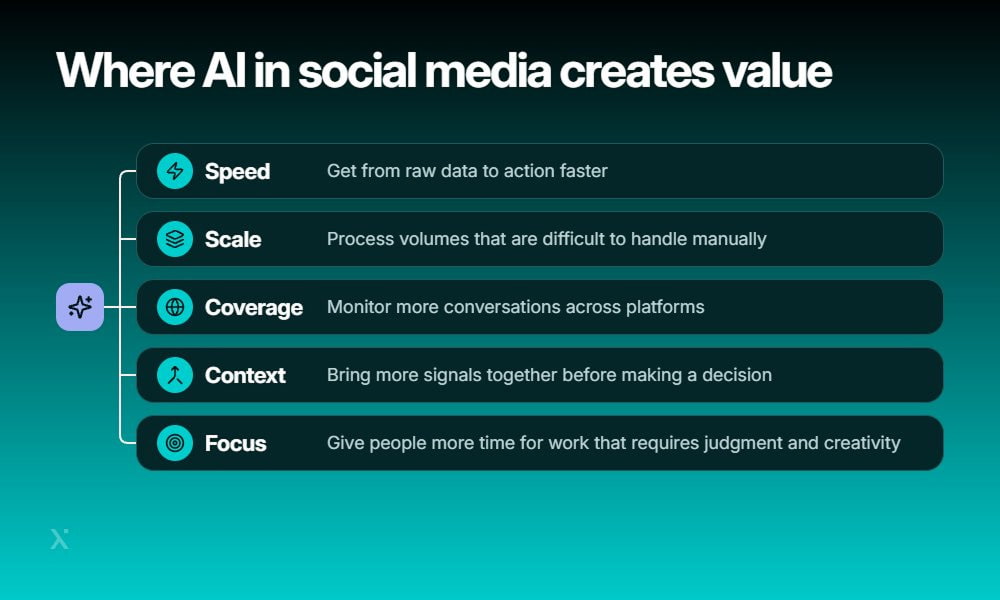
The range of AI in social media examples can be pretty broad, from behind-the-scenes analysis to customer-facing interactions. The key is not to use AI everywhere just because you can, but to apply it where it can remove repetitive work, process more data, or help teams make better decisions.
Here are some of the areas where AI in social media can already make a noticeable difference.
Social listening without the manual work
Social listening usually means keeping an eye on brand mentions, conversations, trends, competitors, and emerging topics across multiple platforms. Doing all of that manually can quickly become a full-time job.
AI can monitor large volumes of social content, identify relevant conversations, group similar topics, and surface unusual changes. Instead of scrolling through endless posts, teams can focus on the conversations that actually need their attention.
Understanding what people are saying
Knowing that people are talking about your brand is one thing. Understanding why they are talking about it is another.
AI can analyze social content for sentiment, intent, topics, emotions, and opinions. For example, it can distinguish between a customer who is asking a question, someone who is frustrated with a product, and someone simply sharing a positive experience.
This makes customer sentiment analysis useful for tracking how audiences react to products, campaigns, and brand changes at scale.
Creating content at scale
Content teams rarely run out of ideas. They run out of time.
AI can help generate posts, captions, scripts, translations, and multiple variations of the same piece of content. It can also adapt content for different platforms, formats, and audiences. This capability gives teams a faster starting point without turning every post into a copy-and-paste exercise.
For businesses that need more advanced content workflows, generative AI integration can connect generative models with existing content systems and business processes.

Exploring Key Generative AI Applications and Use Cases across Industries

How to Build a Generative AI Solution: Technologies, Costs, and Success Factors
Keeping up with comments and messages
Social inboxes can get messy fast. A single brand account may receive product questions, complaints, partnership requests, purchase inquiries, and completely unrelated messages at the same time.
AI can help classify incoming messages, identify their intent, suggest or generate replies, handle routine FAQ questions, and route conversations to the right team. It can also help qualify potential leads by identifying messages that show genuine buying intent.
This doesn’t mean that every message needs an AI-generated response. In many cases, the bigger win is simply getting the right message to the right person faster.
Moderating comments and UGC
Not every piece of social content deserves a response. Some need to be filtered out.
AI can help detect spam, abusive language, unsafe content, policy violations, and other potentially problematic user-generated content (UGC). It can flag suspicious posts for human review or automatically handle clearly defined cases based on content moderation rules.
For large communities, this can reduce the amount of content moderators need to review manually while still leaving sensitive or ambiguous decisions to people.
Turning social data into useful insights
Social platforms generate a huge amount of data, but raw numbers do not automatically become useful insights.
AI can analyze campaign performance, identify trends, detect changes in audience behavior, forecast potential outcomes, and generate recommendations. In addition to that, it can bring information from different sources together so teams can see patterns that might be difficult to spot manually.
For example, AI-based recommendation systems can use behavioral and contextual data to determine what content, products, or actions may be most relevant to a particular user.
Finding and working with influencers
Finding the right creator is about more than counting followers. Brands also need to consider audience characteristics, engagement, content style, brand fit, and potential fraud.
AI can help discover relevant influencers, analyze their audiences, assess brand fit, monitor campaigns, and flag suspicious engagement patterns. This can make influencer marketing less dependent on manual research and spreadsheets.
AI can also support influencer marketing after a campaign starts by tracking performance and identifying which creators or content formats are generating the strongest response. For larger programs, these capabilities can become part of a broader influencer marketing workflow rather than a one-off research task.
Making content more relevant to each audience
The same content doesn’t have to work equally well for everyone. AI can help brands divide audiences into meaningful segments based on behavior, interests, interactions, and other available data.
From there, businesses can personalize content, recommendations, and targeting for different audience groups. This is one of the areas where AI social media marketing can move beyond content generation and become more data-driven.
For a broader look at how these approaches fit into marketing workflows, see our guide to AI in marketing.
AI can handle the heavy lifting, but people still bring context, creativity, and judgment. The goal is to give teams better tools — not take them out of the picture.
All these use cases can support different parts of the social media operation. Some are mainly about reducing manual work, others focus on understanding audiences, and some directly affect customer interactions.
The table below shows what exactly AI can handle in each area and where human input remains extremely important.
AI use cases in social media
| Use case | What AI can handle | Where humans matter |
| Social listening | Mentions, trends, topics, competitor activity | Deciding what deserves a response |
| Audience understanding | Sentiment, intent, emotions, opinions | Interpreting context and business impact |
| Content creation | Posts, captions, scripts, variations, translations | Brand voice, creativity, final approval |
| Comments and messages | Classification, replies, routing, lead qualification | Complex questions and sensitive conversations |
| Content moderation | Spam, abuse, unsafe content, policy violations | Ambiguous or high-impact moderation decisions |
| Social media analytics | Trends, performance, forecasts, recommendations | Business decisions and strategy |
| Influencer marketing | Discovery, audience analysis, fraud detection | Relationship building and campaign direction |
| Personalization | Segmentation, targeting, recommendations | Defining audience strategy and boundaries |
The best AI in social media examples are therefore not necessarily the flashiest ones. A system that quietly sorts thousands of incoming messages, surfaces an important customer trend, or saves a team several hours of manual analysis can create more value than a high-profile feature that nobody actually uses.
The important question is where AI fits into the existing operation — and what needs to happen around it for the system to work reliably.
What AI in social media still struggles with: key challenges
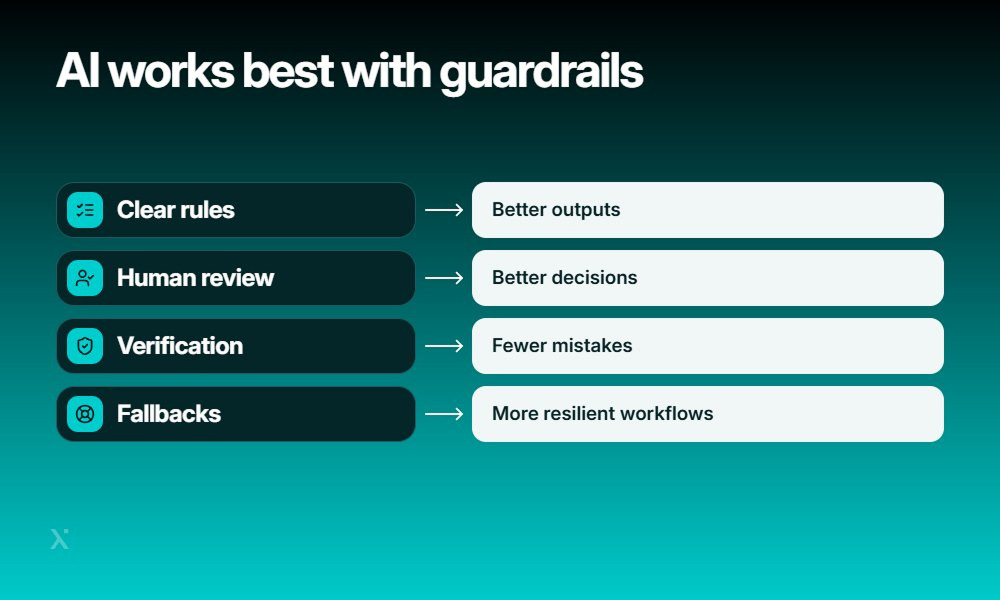
AI can take a lot of repetitive work off a social media team’s plate, but it still has clear blind spots. AI in social media is useful for speeding things up, but some tasks remain difficult to automate reliably.
Where AI still has blind spots
| Challenge | What can go wrong |
| Fully autonomous publishing | A post can go live with outdated information, the wrong tone, or poor timing |
| Sarcasm and cultural context | Irony, slang, memes, and cultural references can be misunderstood or taken literally |
| Sensitive conversations | A generic response can sound insensitive, dismissive, or completely out of touch with the situation |
| Predicting viral content | Past engagement patterns cannot account for every trend, event, audience reaction, or unexpected shift |
| Consistently staying on-brand | AI may follow basic brand rules but miss subtle preferences in voice, humor, or messaging |
| Incomplete or restricted platform data | Missing data can produce incomplete analysis and make otherwise confident conclusions misleading |
These limitations don’t mean businesses should avoid AI social media marketing. The safer approach is to give AI clear boundaries: review content before publishing, provide detailed brand guidelines and examples, verify important claims, and avoid treating predictions as guarantees. Teams should also keep fallback processes for situations where platform data is incomplete or AI cannot confidently interpret the context.
In short, AI should handle what it does well and leave room for people to step in when the situation gets nuanced. AI for social media works best when it supports human decisions rather than trying to make every decision itself.
AI doesn’t always signal when it has misunderstood something. Treat its output as a useful starting point, check important conclusions, and don’t blindly copy and paste what it generates.

Major AI Bias Examples: Tackling Ageism, Sexism, Racism, and More

Artificial Intelligence Regulation: What Laws Do Countries Apply to This Tech?
The data access problem: what AI can actually see
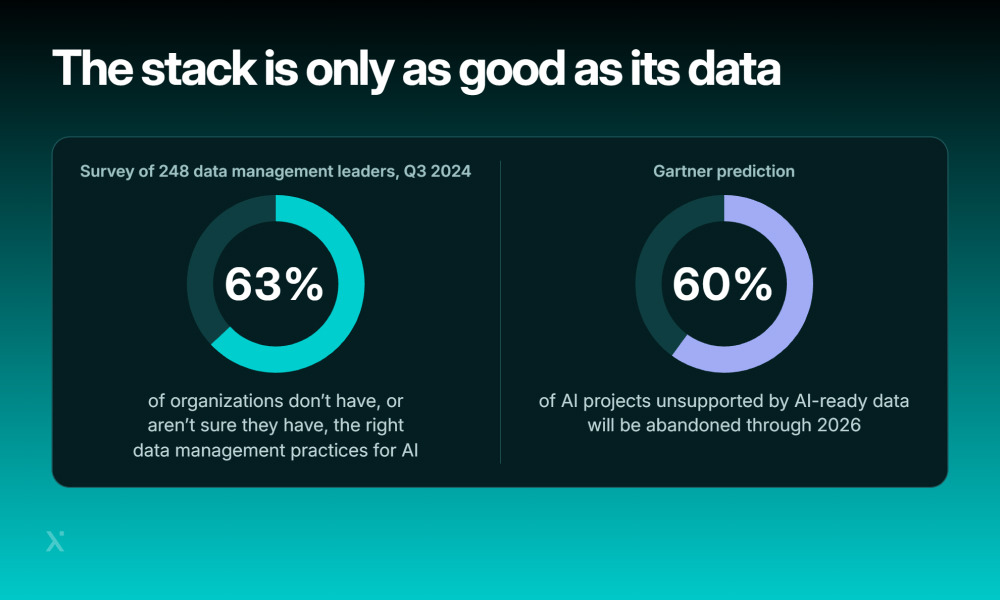
AI may look incredibly smart, but it can’t see everything happening on your social channels. What exactly it can analyze depends on the platforms, permissions, APIs, and data sources connected to it.
What data can your AI access?
| Data source | What it can provide | Common limitation |
| Social platform APIs | Posts, engagement metrics, comments, audience data, and other platform-specific information | Each platform decides what data is available and under which conditions |
| API rate limits and permissions | Controlled access to platform data and actions | Requests may be limited, while some features require specific permissions or approval |
| Public vs private data | Public posts and interactions can often be analyzed more easily | Private messages, restricted profiles, and protected data may be unavailable |
| Owned channels and first-party data | Website activity, forms, newsletters, and other data collected directly by the business | Data can be spread across different systems and may need to be connected first |
| CRM and customer data | Customer profiles, purchase history, preferences, and interactions | Data quality and integration determine how useful it is for AI |
| Social listening providers | Mentions, trends, sentiment, and conversations across multiple sources | Coverage varies by provider, platform, language, and data access |
| Webhooks and real-time events | Instant updates about comments, messages, mentions, or other events | Not every platform or event supports real-time delivery |
| Data quality and history | Historical trends that help AI identify patterns and compare performance | Missing, outdated, duplicated, or inconsistent data can distort the analysis |
This matters because AI in social media doesn’t automatically have access to everything your team can see in a browser. A platform may restrict certain information, limit API requests, or require specific permissions. Your own CRM and customer data can add valuable context, but only if the systems are properly connected and the data is reliable.
That makes data access part of the AI strategy, not just a technical detail. Before building AI in social media workflows, map out which data you actually own, which data you can access through APIs or third-party providers, and what needs to stay outside the system. AI and data privacy should also be considered from the start, especially when workflows involve customer information or behavioral data.
The simple rule is: your AI for social media is only as useful as the data and access behind it. Better integrations, cleaner data, and the right permissions give AI a much stronger foundation to work with.
What does an AI-powered social media stack look like?
An AI-powered social media setup is a connected stack where data flows from social platforms and customer systems into AI models, then back into the tools your team uses every day.
Here’s what the AI for social media stack can look like from the bottom up:
Key layers of an AI-powered social media stack
| Layer | What it does |
| Data sources | Collects data from social platforms, websites, CRM systems, customer interactions, and other first-party sources |
| Integrations and APIs | Connects platforms and systems so data can move between them. Webhooks can also deliver real-time events such as new comments or messages |
| Data and storage layer | Stores, cleans, and organizes social and customer data so it can be used consistently across workflows |
| AI and ML models | Analyzes content, detects patterns, generates text, classifies conversations, predicts trends, and supports other social media tasks |
| AI orchestration layer | Connects models to business rules and workflows, deciding what happens after an AI response, classification, or recommendation |
| Social media tools | Brings AI capabilities into publishing, content creation, analytics, social listening, customer support, and campaign management |
| Human and business controls | Defines permissions, approval steps, brand rules, security measures, and situations where a person needs to take over |
The exact setup depends on what you want the system to do. For example, a content-generation workflow may only need a few integrations and an AI model, while a larger AI in social media marketing platform may connect CRM data, social listening, social media analytics, publishing, and customer support.
The AI layer itself doesn’t have to be built from scratch. Businesses can combine existing AI tools for social media marketing with custom integrations and workflows. This can make it easier to connect AI capabilities to the systems a team already uses. See how AI can fit into your existing tech stack with our guide to AI integration services.

ChatGPT Integration: How Companies Turn AI Into Real Operational Advantage

How to Boost Profits and Increase Client Loyalty with Customer Data Analytics: Complete Guide
How do you know if the AI is working? Measuring business impact
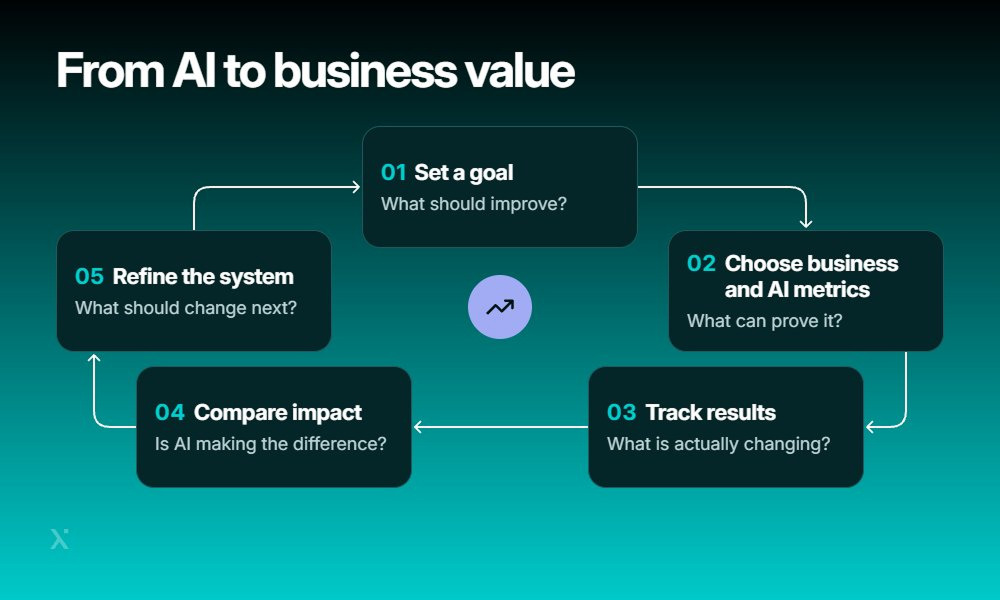
Adding AI in social media is only the beginning. The real question is whether it makes your social media operation faster, more effective, or more profitable.
A useful measurement framework should look at two levels: AI performance metrics show how well the system itself is working, while business metrics show whether that performance actually makes a difference.
Metrics that show whether AI is delivering value
| Area | What to measure | What it tells you |
| Engagement | Likes, comments, shares, saves, engagement rate | Whether AI-supported content is generating meaningful audience interaction |
| Response time | Average time to respond to comments or messages | Whether AI helps the team react faster |
| Content production | Time spent creating and preparing posts | How much time AI saves across the content workflow |
| Moderation accuracy | Correctly flagged vs missed or incorrectly flagged content | How reliably AI identifies harmful, inappropriate, or unwanted content |
| Customer support | Resolution time, first-contact resolution rate | Whether AI helps solve customer issues more efficiently |
| Leads and conversions | Qualified leads, conversion rate, revenue attributed to campaigns | Whether social activity contributes to actual business results |
| Campaign performance | Reach, engagement, conversions, cost per result | Whether AI-supported campaigns perform better against their goals |
| Cost per interaction | Cost per message, response, or resolved interaction | Whether automation makes each interaction more cost-efficient |
| Employee productivity | Tasks completed, hours saved, workload per employee | Whether the team can accomplish more without simply adding more work |
It’s important not to mix these two types of metrics. For example, an AI moderation model might achieve a high accuracy rate, but that doesn’t automatically mean the business is saving money or improving customer experience. Likewise, faster content production only creates value if the extra content actually contributes to engagement, leads, or other business goals.
Start with the business outcome you want to improve, then work backward to the AI metrics that can help explain it. AI in social media should ultimately be measured by the difference it makes to the business, not just by how impressive the model’s technical performance looks.
This is also where AI automation can become useful: these services connect AI with existing tools and workflows to automate repetitive tasks, move data between systems, and trigger actions based on predefined rules or AI decisions. The goal is to reduce manual work while keeping the workflows measurable and aligned with business objectives.
Making AI part of the social media workflow: how teams, processes, and adoption change
What happens after launching AI in social media? The real challenge is making it part of everyday work without creating another tool that employees forget about after the first few weeks — or come to rely on too much.
For enterprise teams, this usually means defining ownership, setting clear review processes, and giving employees a simple way to use AI without removing human judgment.
What changes after launch?
| Area | What needs to happen |
| Ownership | Assign a team or owner responsible for the AI system, its performance, access, and ongoing improvements |
| Human oversight | Decide where people must review, approve, edit, or reject AI-generated content and decisions |
| Output review | Create regular checks for accuracy, brand consistency, bias, tone, and policy compliance |
| Models and prompts | Update prompts, workflows, or models when performance drops, requirements change, or new data becomes available |
| New use cases | Introduce new AI use cases gradually, starting with controlled pilots before rolling them out across teams |
| Employee adoption | Train employees on when and how to use the tools, and make AI part of existing workflows rather than adding extra steps |
AI can handle repetitive work, but social media still needs human context. Teams may want to keep people responsible for:
- Approving sensitive or high-impact content
- Handling unusual customer requests
- Reviewing potentially harmful or inaccurate outputs
- Making final brand and communication decisions
- Monitoring cases where AI behaves unexpectedly
The goal is not to check every AI action manually. It is to decide where human judgment adds the most value and build those checkpoints into the workflow.
Remember, adoption is a process, not a launch task. Employees are more likely to use AI for social media when the tools solve a real problem and fit naturally into the way they already work. Clear guidelines also help teams understand what AI can do, what needs review, and when they should not use it.
A practical rollout can look like this:
- Start with a few well-defined use cases
- Measure how employees actually use the tools
- Collect feedback from social, marketing, support, and compliance teams
- Improve prompts and workflows based on real usage
- Add new use cases once the existing ones are stable
- Review the system regularly as business needs and AI capabilities change
This turns AI in social media from a one-off technology project into an operating capability that can evolve with the organization.
From AI experiment to production: a practical roadmap
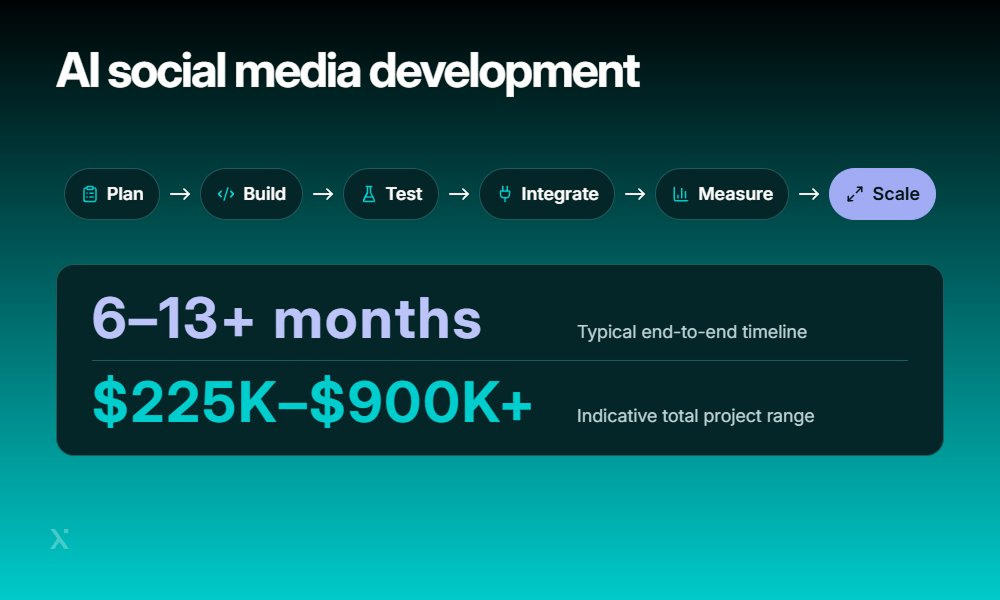
Getting AI in social media into production is rarely a one-step project. Most teams start with a focused use case, test it with real users, and expand only after the results make sense.
The timeline and cost depend on the number of platforms, integrations, AI models, data requirements, security controls, and level of human oversight. A focused MVP may take a few weeks to a few months, while a larger enterprise solution can take significantly longer.
AI for social media: development process
| Step | What happens | Typical timeline | Possible cost range |
| 1. Define the business problem | Set clear goals and decide what AI should actually improve | 1–2 weeks | $5K–$15K |
| 2. Audit data and platform access | Check available data, APIs, permissions, data quality, and security requirements | 2–3 weeks | $10K–$30K |
| 3. Select AI use cases | Prioritize practical use cases such as content assistance, moderation, analytics, or customer support | ~1 week | $5K–$15K |
| 4. Design the architecture | Choose AI models, integrations, data flows, security controls, and human review points | 3–4 weeks | $15K–$40K |
| 5. Build a focused MVP | Develop the core workflow around one or two high-value use cases | 4–8 weeks | $50K–$150K |
| 6. Test with human oversight | Run the system in a controlled environment and review outputs for quality, accuracy, and safety | 2–4 weeks | $10K–$30K |
| 7. Integrate into existing workflows | Connect AI with the tools teams already use and define who handles each step | 2–6 weeks | $25K–$100K+ |
| 8. Measure results | Compare AI performance with business metrics such as response time, conversions, productivity, and cost | Ongoing | $5K–$20K |
| 9. Scale successful use cases | Expand to more teams, platforms, markets, or workflows based on proven results | 3–6+ months | $100K–$500K+ |
Overall, a full AI for social media project can take roughly 6–13+ months and cost around $225K–$900K+, from initial planning through scaling. Some stages can run in parallel, so the actual calendar timeline may be shorter than the sum of individual steps.
It’s also important to note that these are indicative planning ranges, not fixed estimates. Actual timelines and costs can vary based on project scope, platform integrations, data volume, security and compliance requirements, and the level of customization.
Start small first
A common mistake is trying to automate the entire social media operation at once. A better approach is to start with one clear problem, build a manageable MVP, and use real results to decide what comes next.
This also makes AI in social media easier for employees to adopt. Teams can see where the technology helps, give feedback, and gradually expand its role without having to redesign the whole workflow on day one.
How Much Does AI Development Cost in 2026?

The Complete Guide to AI Agents Development in 2026
Build, buy, or hybrid? Choosing the right approach to AI social media development
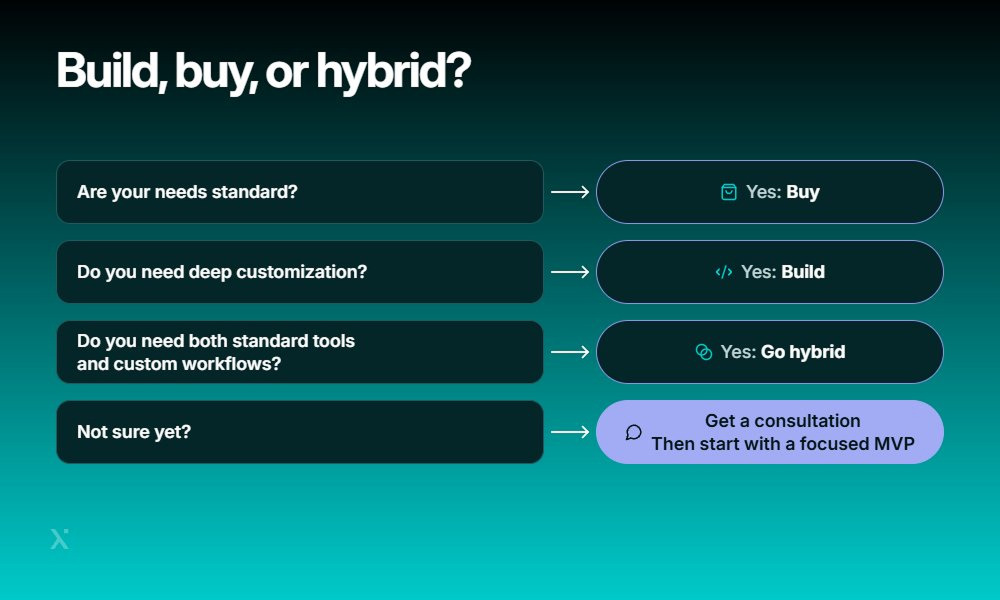
Is there a single way to bring AI in social media into a business? Not really. Some teams can get what they need from an existing tool, but others may need a custom system that fits their data, workflows, and platforms.
The right choice usually comes down to how much control you need, how quickly you want to launch, and how deeply AI needs to connect with the rest of your business.
Build vs buy vs hybrid
| Approach | Best for | Control & customization | Integrations | Cost & speed | Scale |
| Build: custom AI | Complex workflows and unique business requirements | High | Can be built around existing systems | Higher cost and longer development | Strong for enterprise needs |
| Buy: off-the-shelf tools | Standard content, analytics, scheduling, or moderation needs | Limited | Usually easy | Lower cost and faster launch | Good for common use cases |
| Hybrid: build + buy | Businesses that need flexibility without building everything from scratch | High where it matters | Combines existing tools with custom components | Balanced cost and speed | Flexible as needs grow |
When should you buy?
Off-the-shelf AI tools for social media make sense when your requirements are fairly standard. They can help teams get started quickly with features such as content generation, social listening, analytics, scheduling, or basic moderation.
The tradeoff is less control. You may have limited options for changing how the AI works or connecting it to specialized internal systems.
What about custom development?
Custom development is worth considering when AI needs to work closely with your existing products, data, or business processes. It gives you more control over integrations, user roles, workflows, security, and how AI outputs are reviewed.
The downside is straightforward: custom systems require more time, technical expertise, and upfront investment. If you are testing an idea, starting with a social app MVP development approach can help validate the use case before expanding it into a larger platform.
Why do many enterprises choose hybrid?
A hybrid approach can offer a practical middle ground. Instead of building every AI capability from scratch, teams can use proven third-party tools for standard tasks and develop custom components where the business needs more control.
For example, a company could use an existing platform for social analytics but build its own AI layer for content approval, customer data integration, or internal workflows.
This approach can make AI in social media faster to launch without giving up the flexibility needed for more complex enterprise use cases.
Still not so sure which way fits most? AI consulting can help compare the available approaches and define a practical path from the first use case to a production-ready solution.
How PixelPlex can help build and launch AI social media solutions
Every social media team has different needs, so AI solutions should be designed around the workflows, data, and systems already in place. PixelPlex can help build the AI capabilities, integrations, automation, and architecture needed to support those specific requirements.
PixelPlex at a glance
| Experience | Details |
| 17+ years | In the technology industry |
| 450+ projects | Delivered across different industries and use cases |
| $1.2 billion | Raised by our clients |
| 50 million end-users | Onboarded across clients’ dApps |
For social media projects, our work can cover:
- Custom AI development for specialized workflows and use cases
- AI integrations with social platforms and enterprise systems
- Data pipelines for collecting, processing, and preparing data for AI
- Recommendation engine and personalization systems for more relevant user experiences
- NLP and sentiment analysis for understanding social content and audience feedback
- AI-powered automation for repetitive marketing and customer-facing tasks
- Enterprise architecture designed for security, scalability, and reliability
- Ongoing optimization as models, data, and business requirements evolve
For organizations that want to automate a specific marketing workflow, PixelPlex offers AI marketing agent development starting at $15,000.
The starting package includes:
- Workflow analysis and agent architecture
- Custom LLM configuration
- Single-platform integration
- Testing and security guardrails
The PixelPlex team’s goal is simple: to help businesses move from experimenting with AI in social media to deploying solutions that fit their existing workflows and can scale with them.
Whether you are evaluating the best AI for social media marketing or building a custom enterprise system, the right architecture and implementation strategy can make the difference between a useful tool and another piece of software nobody uses.
FAQ
Yes. Smaller businesses can start with focused tools for tasks such as content assistance, customer communication, or basic analytics without building a custom system. The key is to match the technology to the team’s size, budget, and actual workload.
Clear internal guidelines, approved tool lists, employee training, and appropriate access controls can reduce so-called “shadow AI.” It also helps to provide employees with approved alternatives that are easy to use for their everyday tasks.
It can, but performance may vary significantly between languages. Before using AI across international markets, businesses should test outputs for translation quality, cultural nuances, terminology, and local brand guidelines.
Businesses should clarify how their data is stored and used, what happens to prompts and outputs, which models power the service, how data can be exported, what integrations are available, and what happens if they decide to leave the platform.
An internal policy can give employees clear rules for approved tools, sensitive data, content review, disclosure requirements, and situations where AI should not be used. It can also make responsibilities easier to understand across marketing, legal, security, and compliance teams.
Start by identifying which datasets are actually useful, then clean duplicates, standardize formats, remove unnecessary information, and establish clear ownership. Good data preparation can improve AI performance and make results easier to audit.
There is no universal timeline. Some productivity improvements can be visible soon after deployment, while outcomes such as stronger customer retention, better campaign performance, or increased revenue may require several months of consistent measurement. Establishing a baseline before launch makes these changes easier to evaluate.